Since Facebook has become this massive social media giant, renaming your Facebook Page can feel like navigating a maze. In the earlier days, the app had different settings and processes that needed to be met for page owners to rename their pages, but now, you could just get your page renamed in a minute.
You can be rebranding your cooking page, giving a different look to the virtual gift shop you operate via Facebook Marketplace or simply wanting to call a different name, renaming a page can become particularly tough when you are not that tech savvy or just aren’t familiar with the platform mechanics.
This guide will walk you through easy steps that will successfully change your Facebook page name, without any stress.
Facebook Limitations for Name Changes
Before we begin the process of name change, please remember that Facebook limits name changes to once every 60 days. This rule stops spam and keeps things consistent for users. Plan your name changes carefully to avoid hitting this limit. Keep in mind that:
- Name Change Frequency: Once every 60 days
- Review Process: Up to 3 business days
- Admin Requirement: On Facebook, if a page has more than 200 likes, you need to be an admin to change the page name, and only admins can make these changes.
NOTE: Breaking Facebook’s rules can harm your page. It might get suspended, or you won’t be able to change the name. Always follow the guidelines to keep your page safe.
How to Change Your Facebook Page Name

In six easy steps, you can change your Facebook page name:
Log in to Facebook
Log in to Facebook the normal way you want to access your private Facebook.
Switch Your Profile to Your Page Admin
Click your profile photo on the top right of your screen from any device. Choose See All Profiles, and your page should be listed there. Click on its profile picture to switch.
Go to Settings
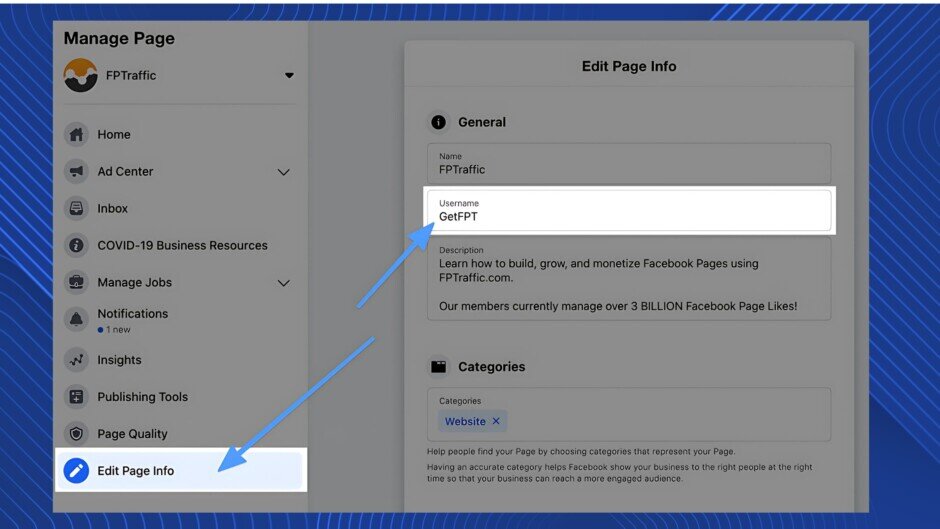
Next, head to Settings & Privacy, on the left side of the page. Select Settings. Search for the General Page Settings and select the Edit option. If you cannot find it, it is to the right of your Facebook page name.
Rename Your Facebook Page
Once you’ve clicked into the Edit box, type a new name. Here are some of the naming rules you have to take into consideration before naming your page again:
- Do not use “Facebook” as a variation as your page name
- No symbols, numbers, random capitalization, repeating characters or punctuation
- No characters from languages other than English
- Any political/religious/professional titles or company name
- No string of random words or phrases
- No misleading words or phrases
- Offensive or suggestive/discriminatory words of any kind
Submit a New Name
Click Review Change following your entered altered name to save it. If you do not see this option, confirm that you are listed as a page admin. Please note that other page responsibilities cannot access changes in Facebook page name.
Go left side of the screen and select Settings to get those choices. You can see your role from the Page Roles.
You must be an admin of the page. Without admin privileges, you won’t have the necessary permission to request a name change. If you are an administrator and you still cannot access the Request Change option, be sure no one has tried to alter the name in the recent several days.
If you are sure that there are no more issues, go ahead and click on the Request Change setting. You will be prompted to give your password. Be sure to remember that. Also make sure that you are not putting in a request within 60 days of previous name change as Facebook does not allow that. There is no limit to how many times you change your page name.
Wait for Confirmation
Facebook does not take long to confirm your name changes. If you face a delay i.e., more than a day or two, it might be wise to reach out to Facebook and ensure there is no issue with the name.
Tips for a Successful Name Change
- Be Specific and Clear: Choose a name that clearly represents your page’s purpose or brand.
- Avoid Misleading Terms: Ensure the name doesn’t imply an official association with Facebook or other entities unless authorized.
- Maintain Consistency: Align your page name with other branding materials for uniformity.
Fixing Common Issues Following Page Name Change
Changing the name of your Facebook page cannot always be simple. Following the guidelines for changing Facebook page name will help us to investigate the most common issues with this process and their fixes.
Review Facebook’s naming rules carefully in case your name request is turned down. Steer clear of symbols, poor capitalization, and vulgar language. You might like to submit your request under consideration following guidelines.
Conclusion
Renaming your Facebook page is simple when you approach tasks one at a time. You can successfully change your page name to match your brand or purpose if you know what you’re doing, follow the instructions, and respect Facebook’s rules. Remember that realistic and honest portrayal helps your brand to build trust and involve your audience.
On Facebook, you only have one seven-day change-of-page-name limit. They usually take three or four days to review it. Should the likes count on your page surpass 200, you could be subjected to other roles i.e., admin, moderator, etc.
Give it some very thought before you act because once you start a modification, there is no turning back.
Frequently Asked Questions (FAQs)
Q: How long does it take for Facebook to approve a page name change?
A: Facebook typically reviews and processes name change requests within three business days.
Q: Can I change my Facebook Page name multiple times?
A: Yes, but frequent changes may be subject to restrictions. It’s advisable to choose a name you’re satisfied with to avoid repeated changes.
Q: Will changing my page name affect my followers?
A: No, your followers will remain intact. However, they may be notified about the change of name.
Q: What should I do if my name change request is denied?
A: Review Facebook’s naming policies, ensure compliance, and consider simplifying the proposed name before resubmitting.
Q: Is there a limit to how many times I can change my page name?
A: While there’s no official limit, frequent changes can lead to restrictions or delays in approval.