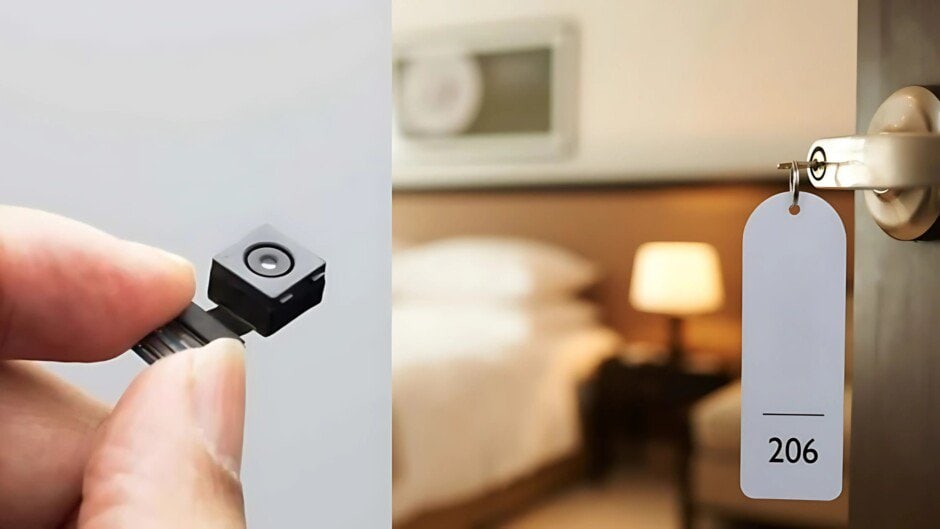
With the rise of technology, we can never be too sure of our privacy in public. These concerns skyrocket when you plan on staying in a hotel or Airbnb, but it might not be the only places under illegal surveillance. Countless incidents have come up in recent years where hidden bugs and cameras were found in try rooms, restrooms and even workplaces and homes. In some cases, these surveilled areas were livestreaming to an audience over the dark web.
Anyone wanting to learn about privacy should learn more about how bugs and hidden cameras operate, and how to stay safe. It is why we bring you a guide explaining how you can be in your home inspector game with classic tips and tricks. We have ensured our readers find this comprehensive guide that will walk you through step-by-step methods for detecting hidden cameras, practical tools, and legal considerations.
Why Hidden Camera Detection Matters

Hidden surveillance devices are easy to carry and plant, often without the knowledge of those surveilled. It makes it a serious legal issue, much more than a privacy one. In some countries, it is illegal to install cameras for protection in certain areas where people expect privacy, despite them being in public. These may include restrooms, waiting areas, bedrooms in hotels, etc.
Hidden camera detection becomes even more important because it safeguards privacy and helps ensure personal safety and security. No one would want to take a vacation and expect getting recorded (often uploaded on the internet later) to be the highlight of their fun time. Detecting these hidden cameras allows tourists to address potential privacy violations and take measures to protect themselves, their families, and their belongings.
Based on the rising such incidents in 2024, the leading online rental living space provider Airbnb, implemented a ban on indoor cameras Many other platforms followed suit to address these concerns. These platforms now encourage tourists and privacy inspectors to bring forward as many cases as possible to curb these issues, making it a moral obligation to be vigilant while staying in places owned by corporate housing.
Recognizing Signs of Covert Surveillance
Since hidden surveillance devices need to be covertly disguised in the surrounding,, there are some tell-tale signs that can help identify them. You need to pay a little more than usual attention to details when you finally check into your room. Following that you need to follow a methodical approach to find potential bugs and cameras.
1. Oddly Placed Objects
- Smoke Detectors & Clocks: These household items often conceal hidden cameras. Removing covers and inspecting lenses or wiring can uncover these devices.
- Air Vents & Speaker Grilles: Tiny holes or unusual sealants around vents or speaker grilles can hide cameras. Make sure to inspect these areas for any unusual components.
2. Visual & Reflective Clues
- Flashlight Test: In dim light, slowly pan a flashlight across the room. Camera lenses will reflect light, creating tiny bright spots in unexpected areas.
- Mirror Test: Perform the “fingertip test” by pressing your finger against the mirror. If there’s no gap between your finger and its reflection, the mirror might be a two-way mirror, often used to conceal cameras.
3. Network & Signal Indicators
- Unusual Network Devices: Use apps like Fing to scan the Wi-Fi network. If you notice any unknown MAC addresses or devices, it may be a sign of a hidden camera or bug.
- Signal Spikes: RF detectors can detect radio frequencies emitted by wireless cameras, even when they are powered off. A sudden spike in signal strength indicates the presence of a hidden device.
Essential Detection Tools that Every Tourist Should Have
The tools listed below are usually marketed to home inspectors, but it is always wise to get one or more of them if you are traveling. Especially solo travellers which include women can benefit from having essential detection tools.
Here are some of the most popular bug and camera detectors:
RF (Radio Frequency) Detectors
RF detectors have a frequency range of 50 MHz to 3 GHz. It is ideal for finding wireless cameras, microphones, and GPS trackers. Some popular models include:
- Polesnow X13 Anti-Spy Detector: Detects Wi-Fi, mobile signals, and Bluetooth signals. It features vibration alerts and adjustable sensitivity.
- SpyFinder Pro Hidden Camera Detector: Combines RF and lens detection, making it compact and effective for building inspections.
You can easily find them online for purchase or visit a tech store for more detailed shopping.
Lens Detectors & Flashlight Methods
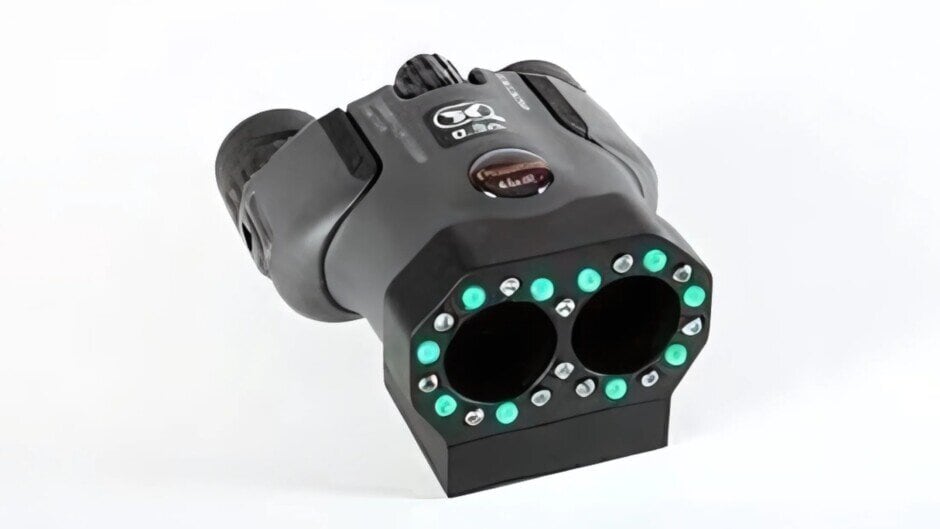
Lens detectors, which use LED light to highlight camera lenses, are useful for detecting hidden cameras in objects, décor, or furniture. Alternatively, using a flashlight in a dark room can reveal tiny pinhole lenses that reflect light.
Smartphone Apps & Scanners
While not foolproof, smartphones can provide a quick preliminary check.
- Infrared (IR) Detection: Your phone’s front camera can detect infrared LEDs used in night-vision cameras by showing glowing dots in the dark.
- Network Scanners: Apps like Fing and Net Analyzer can scan local Wi-Fi networks for unrecognized devices. Google also provides Anti-Bugging – a feature for identifying if your phone is being taped with the help of a hidden mic– to their Android users.
Step-by-Step Detection for Tourists
Here is how to proceed with hidden bug and camera detection as a non-professional:
Manual Inspection
This method requires no special tools and is highly accessible. Turn off the lights to create a dark environment, then use a flashlight to scan for reflections from camera lenses. Focus on common hiding spots, listening for faint buzzing sounds from motion-sensor cameras. This approach is effective for initial sweeps, especially in rentals or hotels.
Smartphone Apps
Smartphones offer a convenient detection tool, leveraging infrared and Bluetooth capabilities. Use the phone’s camera in a dark room to spot bright lights from night vision cameras. Download reputable apps, such as those from the Google Play Store or Apple App Store, for Bluetooth or RF detection. However, reliability varies, so choose apps with strong reviews to avoid malware risks.
RF Detectors
For a more reliable option, RF detectors pick up radio frequencies from wireless cameras, beeping or lighting up near signals. Turn off other wireless devices like Wi-Fi routers and microwaves to minimize interference, then slowly move the detector around suspected areas. Costs range from $20 to hundreds, with models like the LM-8 Detector covering 20 MHz to 6 GHz, ideal for comprehensive sweeps.
Infrared Scanners
Infrared scanners detect night vision cameras by showing glowing spots in darkened rooms. While not foolproof, this method is effective for identifying infrared-equipped devices, complementing other techniques.
Wi-Fi Network Scanning
If connected to the network, check for unrecognized devices via the router’s admin page. Look for names like “IP Camera” or “Security Cam,” and disconnect suspicious devices to disable them. This method is less effective on open networks like hotels but valuable in controlled environments.
Advanced Techniques
For thorough checks, consider the mirror test: place your finger on a mirror; no gap suggests a two-way mirror, and a hollow tap sound confirms it. For audio bugs, use white noise generators or loud music to render recordings unusable, adding an extra layer of privacy protection.
Step-by-Step Detection Workflow for Home Inspectors
If you are a home inspector, ensuring thoroughness is key. Follow these steps to perform a comprehensive surveillance device sweep:
- Pre-Inspection Briefing: Inform the concerned party before beginning the sweeping about the camera detection services you offer. It is highly recommended that you get written consent for accessing the property.
- Visual Sweep: It is always good to get a good idea of the area you are covering. Always use a flashlight or lens detector to scan from the corners inward, focusing on suspicious objects. It is also a must for dimly lit areas.
- RF Scan: Slowly traverse each room with an RF detector. Pay special attention to areas with high signal strength and investigate further if necessary.
- Network Audit: Connect your smartphone to the property’s Wi-Fi network and run a scan for any unfamiliar devices. Log into the MAC addresses and device types.
- Physical Inspection: Open suspicious items like smoke detectors, clocks, or power adapters and look for hidden lenses, wires, or circuit boards.
- Document Findings: Take photos of each detected device and note its location, signal strength, and identifiers for future client reports.
- Client Debrief: Review your findings with the client, explain the privacy implications, and recommend either removal or remediation by professionals.
Conclusion
Suspecting the presence of a hidden device is frightening. It’s a serious invasion of privacy that must not be ignored. If you find a hidden camera, notify the police immediately, and they will launch a full investigation into the incident.
While detecting a hidden camera means you can cover it up or leave the premises, never attempt to disable, remove, or turn it off. Police obtain fingerprints for investigations, so try not to touch, wipe, or interfere with it in any way in the meantime.