We all rely on our smartphones for almost everything, from checking WhatsApp messages, scrolling through Instagram and TikTok, to making online payments, attending Zoom classes, or even navigating traffic with Google Maps. In Pakistan, where life is busy and many of us are on the move, having a phone that lasts all day is no longer a luxury; it’s a necessity.
Yet, many Android users notice something frustrating: their phone battery drops quickly, sometimes from 80% in the morning to 30% by afternoon, even if they haven’t used it heavily. It feels like the battery is draining randomly, leaving people confused and stressed. The truth is, battery drain is rarely random. It happens because of real, measurable reasons, from weak mobile signals and background apps to heat, heavy usage, and charging habits. In this guide, we’ll explain exactly what is draining your battery, debunk common myths, and show you practical steps to get your phone’s battery life back on track.
Background Apps Are Constantly Working (Even When You’re Not)
One of the biggest reasons for battery drain is background activity. Many apps don’t fully “sleep” when you close them. Instead, they continue syncing data, checking notifications, updating location, or running services silently.
For example:
- Facebook and Instagram refresh feeds.
- WhatsApp checks for messages.
- Google Maps tracks location.
- Food delivery apps monitor GPS.
Every time an app wakes the processor, it consumes power. This is called a wakelock, and too many wakelocks drain battery quickly.
In Pakistan, many users install dozens of apps: banking apps, ride-hailing apps, shopping apps, gaming apps, and forget about them. Even if you don’t use them daily, they still run background processes.
What You Can Do:
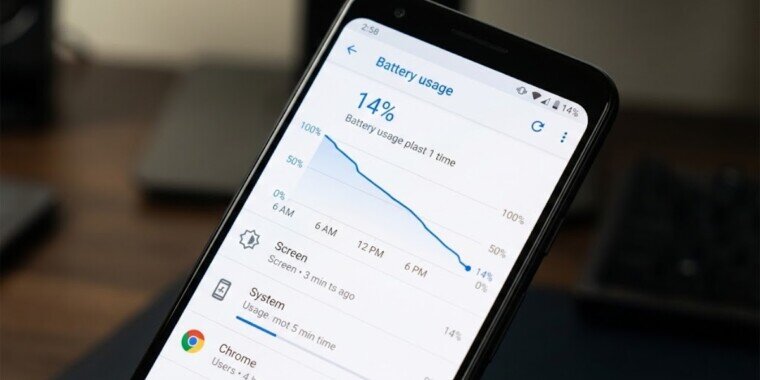
- Go to Settings > Battery > Battery Usage
- Check which apps are consuming the most power
- Restrict background activity for unnecessary apps
- Uninstall apps you don’t use
Don’t use third-party “task killer” apps. Android already manages memory efficiently.
Weak Mobile Signal Drains Battery Faster Than You Think
This is a major issue in Pakistan. If you live in an area with weak 4G or unstable signals, your phone constantly searches for a better network. That search consumes significant battery power. When the signal drops from 4G to 3G and back repeatedly, the modem works overtime.
Common situations:
- Inside buildings with poor coverage
- Traveling between cities
- Load shedding is affecting the towers
- Basement offices or rural areas
When signal bars are low, your battery drains much faster.
Why This Happens:
Your phone increases its power output to stay connected to the network. The weaker the signal, the more energy it uses.
What You Can Do:
- Switch to Wi-Fi when possible
- Turn on Airplane mode in no-signal areas
- Lock network type (e.g., only 4G instead of automatic switching)
- Use Wi-Fi calling if supported
Weak signals can drain 10–20% more battery daily.
High Screen Brightness and Refresh Rate
Your screen is the biggest battery consumer. Modern Android phones in 2025 come with:
- 120Hz or 144Hz refresh rates
- AMOLED displays
- High brightness levels
While these features look great, they use more power.
Brightness:
Many users in Pakistan keep the brightness high because of the sunlight. Outdoor usage in cities like Lahore, Karachi, and Islamabad increases screen power consumption.
High Refresh Rate:
A 120Hz display refreshes twice as often as 60Hz. That means more GPU and CPU usage.
What You Can Do:
- Use Auto brightness
- Switch to 60Hz mode if battery is a priority
- Use dark mode (especially on AMOLED screens)
Dark mode on AMOLED screens saves measurable battery because black pixels turn off completely.
Battery Health and Aging
Lithium-ion batteries degrade over time. After 500–800 charge cycles, battery capacity reduces.
If your phone is:
- 2–3 years old
- Heats up often
- Drains fast even on standby
Then battery health may be the issue.
In Pakistan, many users charge phones overnight or use fast chargers frequently. While modern phones are smart enough to stop charging at 100%, heat still affects battery lifespan.
Signs of Battery Degradation:
- The battery drops quickly from 20% to 0%
- Phone shuts down unexpectedly
- The battery drains even in airplane mode
What You Can Do:
- Avoid extreme heat
- Use the original charger
- Keep the battery between 20% and 80% when possible
- Replace the battery if the health is below 80%
Battery replacement is often cheaper than buying a new phone.
Heat Is a Silent Battery Killer
Pakistan’s weather plays a big role. High temperatures in summer (especially above 35°C) increase battery stress. Heat accelerates chemical aging inside lithium-ion batteries.
Common heat causes:
- Gaming for long hours
- Charging while using the phone
- Leaving the phone in the car
- Using a phone in direct sunlight
Heat doesn’t just drain battery temporarily; it permanently reduces battery capacity over time.
What You Can Do:
- Avoid heavy gaming while charging
- Remove phone case if overheating
- Don’t leave your phone under a pillow while charging
- Keep the phone out of direct sunlight
Gaming and Heavy Apps
Games like PUBG, Call of Duty, and Genshin Impact use:
- CPU
- GPU
- Internet
- Screen brightness
- Audio system
This combination is a battery killer. One hour of heavy gaming can consume 15–25% battery, depending on the device.
Social media apps like TikTok and Instagram Reels also drain battery because:
- Continuous video playback
- High brightness
- Data usage
This drain is not random. It’s measurable and expected.
Poor Charging Habits
Many people believe charging to 100% is bad. That’s not completely true.
Modern Android phones have charge management systems. But certain habits still reduce long-term battery health:
Bad habits:
- Using cheap chargers
- Charging from unstable power sockets
- Playing games while charging
- Letting the battery drop to 0% frequently
In Pakistan, voltage fluctuations can also affect charging efficiency if you’re not using a quality adapter.
Best Practice:
- Use an original or certified charger
- Avoid extreme 0% discharges
- Don’t use fake fast chargers
Software Bugs and Updates
Sometimes battery drain starts after a software update. That’s not a myth.
Reasons:
- Apps not optimized for the new Android version
- Background re-indexing after update
- Cache rebuilding
- System bugs
Usually, the battery stabilizes after a few days.
What You Can Do:
- Restart phone after update
- Clear the cache partition
- Update apps
- Factory reset only if the problem continues
Common Battery Myths (That Waste Your Time)
Myth 1: Closing All Apps Saves Battery
Wrong. Android is designed to manage apps in memory. Force-closing apps repeatedly actually uses more power because reopening them consumes extra CPU.
Myth 2: Battery Saver Apps Improve Performance
Most third-party battery apps:
- Show ads
- Run in the background
- Consume battery themselves
Android already has built-in battery optimization.
Myth 3: Charging Overnight Destroys Battery
Modern phones stop charging at 100%. Overnight charging is generally safe. The real problem is heat, not the time plugged in.
Myth 4: More RAM Means Better Battery Life
RAM does not directly control battery life. Processor efficiency and software optimization matter more.
How to Diagnose Your Own Battery Drain
Instead of guessing, check:
- Battery Usage Menu
- Identify top battery-draining apps.
- Screen-on Time
- More than 6–8 hours daily? That’s normal drain.
- Signal Strength
- Low bars mean higher drain.
- Phone Temperature
If warm frequently, the heat is draining the battery.
Battery Health
Some brands show battery health percentage.
Practical Fix Checklist
- Use Wi-Fi when possible
- Reduce screen refresh rate
- Enable dark mode
- Uninstall unused apps
- Avoid overheating
- Update apps regularly
- Use the original charger
- Replace the battery if necessary
These steps make a real difference.
Final Thoughts
Android battery drain isn’t random. It’s caused by real factors like weak signals, background apps, heat, aging batteries, and heavy usage. Most users waste time changing random settings instead of addressing the real issue.
In Pakistan, factors like unstable network signals, hot weather, and heavy social media usage make battery drain more noticeable. But once you understand what’s happening behind the scenes, you can fix it properly.
Instead of guessing, check your battery usage, identify the cause, and take practical steps. A few smart adjustments can easily add hours back to your daily battery life. Your battery isn’t broken. It’s just reacting to how you use your phone.