In 2009, Pakistan got a quick and easy payment service across the country in form of “Easypaisa” – a phone wallet for the registered users of Telenor Pakistan mobile phone service. Over the years, Easypaisa has become a household name: almost synonymous with PayPal and Google Pay, in a country where up until recently global wallets were nonexistent.
It is also the same reason that Easypaisa currently sits at more than 10 million active users (as of March 2024 data), giving an opportunity for people to conduct financial transactions such as bill payment, sending and receiving money within the country, charity and donations, insurance and savings, etc. You can even send any amount to CNIC if you do not have their bank account details, making Easypaisa a unique tool in the digital bank account landscape.
The good thing about Easypaisa today (recently rebranded as Easypaisa Digital Bank) is that you do not have to be just a Telenor SIM card holder to avail yourself of all the benefits. The following is a detailed guide to make an Easypaisa account from scratch. If you follow these steps, you will get an account running within two minutes.
Why Choose Easypaisa?

Let’s see some more benefits from opening an Easypaisa account to solidify your decision to choose the right mobile wallet.
- Easy Money Transfer: You can send money to any bank account, mobile wallets (support for all major telecom companies), and even CNIC number.
- No Middleman: Since there is no intermediate, there are no traditional banking hurdles and formalities. To open an account, all you need is your valid CNIC and mobile number.
- Mobile Top-ups: With Easypaisa, you can also recharge your phone instantly as it supports all the major telecom providers, both prepaid and postpaid.
- Data Security: Easypaisa supports advanced security protocols to ensure the transactions reach their destinations safely and without external interference.
- Loans: Easypaisa has recently launched a short-term loan provision services where you can get up to PKR 10,000 for entrepreneurial ventures.
Requirements of Opening an Easypaisa Account
Here are a few requirements to fulfill before you open an Easypaisa account:
- A valid CNIC
- An active phone number
- Age must be 18 or older
Step-by-step Guide to Opening an Easypaisa Account
Step 1: Download Easypaisa Digital Bank App
Anyone can download Easypaisa app from the following app stores:
- Apple App Store (Link: https://apps.apple.com/pk/app/easypaisa-a-digital-bank/id1227725092)
- Google PlayStore (Link: https://easypaisa.onelink.me/cw4d/q9y8ba5v)
- Huawei Store (Link: https://appgallery.huawei.com/#/app/C101070401)
Step 2: Register your account
Once you have downloaded the app, open it and enter your mobile number upon prompt. Click on the ‘Next’ button to move to the next screen.
- Now enter your CNIC number with the date of issuance as per the card and click ‘Register.’
- The screen will tell you to enter the OTP sent against the number you registered with.
- Accept the terms and conditions after thoroughly reading them.
- Create a personal PIN of 5 unique numbers, and you can now use Easypaisa mobile account.
- In case you cannot install the app on your device, you can also dial the USSD to create an account for you.
For Telenor users, simply dial *786#, enter your CNIC and date of issuance, create the 5-digit PIN and wait for confirmation. After re-entering the PIN as confirmation and agreeing to terms and conditions, you can now use your Easypaisa mobile account.
For other carriers, dial *2262#, followed by the same process as above to get your Easypaisa account. Please note that it does not cost you any price to create an Easypaisa account via USSD or app. Also, be aware that you are downloading the app from Telenor Microfinance Bank Limited to avoid fraudulent versions.
Step 3: Add funds
Now that your account is registered, you would want to set it up for transactions. There are two notable ways you can do so:
- Going to an Easypaisa Cash Point
- Using bank transfer
With the first method, you will have to locate a Cash Point near you. Usually, many vendors carry Easypaisa service on the side (aka Cash Points), and it is easy to spot them because they display the logo of the app on their shops. If that is a bit tedious, you can also use the Cash Point locator on the app to find the nearest shops where you can go and deposit cash.
Since the first deposit is always via a Cash Point agent, you cannot use bank transfer the first time. However, after that, you can seamlessly use a bank account to transfer to and from your Easypaisa account. Also note that for the first transaction, a biometric verification is done to match the records against your CNIC.
Step 4: Explore features
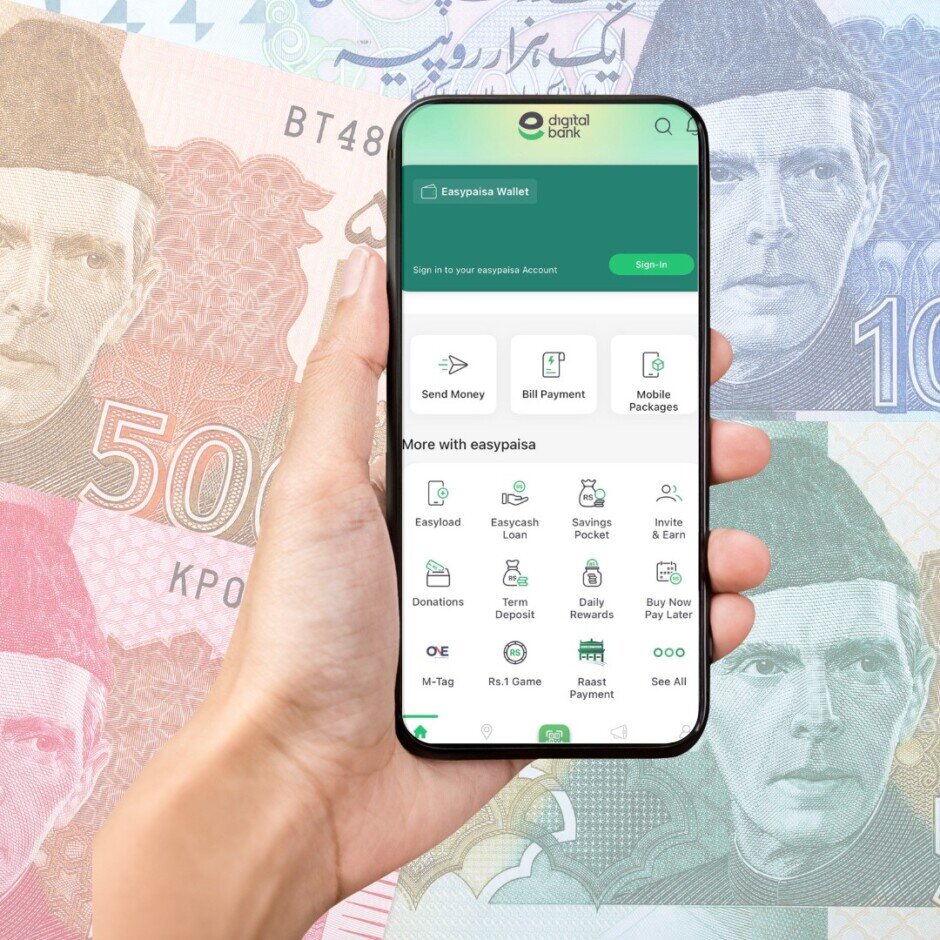
After securing funds for your mobile wallet, you can now explore all the other services Easypaisa has to offer. You can pay gas or electricity bills, recharge your phone, send loan to a friend or contact, create a savings account, use the referral program to earn money, donate to reputable charities, shop online and even use it to pay challans.
Step 5: Security tips
Since it is a virtual bank account without the physical security aspect of a bank, you will have to use some tips to secure your online account. Always make sure that no one knows your PIN, which should be unique to only you. Avoid calls that claim they are from a bank or Easypaisa, requesting personal information. Keep track of all your transactions and monitor if any payment has been made without your knowledge. Easypaisa repeatedly claims that they or their agents do not ask you for your PIN via SMS or calls.
Frequently Asked Questions (FAQs)
What are the transaction limits for Easypaisa accounts?
Can I use Easypaisa to send money internationally?
Can I create an Easypaisa account without CNIC?
Can I change the CNIC number linked to my mobile account?
I do not have access to my registered mobile number. What do I do?
Conclusion
As you can see, Easypaisa account creation can be created in 2 minutes no less if you know the requirements and personal identification details. Having the country’s most used digital wallet brings numerous financial services to your doorstep: you can use it for almost anything online without having to carry cash around.
Easypaisa has proven over the years that it offers a secure and crystal-clear way to manage transactions. Not to mention the ease of use of the app itself is a bonus that even someone with a basic knowledge of phones would be able to navigate through the app and its services.