Google has rolled out a series of updates across Chrome and Android platforms, just in time for Global Accessibility Awareness Day (GAAD) 2025.
These improvements focus on making web content, images, and sound more understandable and usable for everyone, particularly people with visual or auditory challenges.
Zoom Text Without Breaking Web Layouts
Google Chrome for Android now includes a new Page Zoom feature that lets users zoom in on just the text, without distorting the overall design of the webpage. Previously, zooming in enlarged the entire page, which could make navigation awkward.
With this update, users can now increase text size using a slider, found in the three-dot menu at the top-right corner of the browser. They can choose to apply this setting to a single page or across all websites.
As Google explains, “Page Zoom now lets you increase the size of the text you see in Chrome on Android without affecting the webpage layout or your browsing experience — just like how it works on Chrome desktop.”
Chrome OCR
On desktop, Chrome’s Optical Character Recognition (OCR) tool is now fully available to all users. It automatically detects and processes scanned text in PDF documents, allowing users to:
- Highlight specific sections
- Copy text
- Search within the document
- Use screen readers for improved accessibility
This upgrade turns static PDFs into machine-readable formats, significantly improving usability and accessibility for people who rely on assistive technologies.
TalkBack on Android
TalkBack, Android’s screen reader, now works even more seamlessly with Google’s Gemini AI. This updated integration offers intelligent image descriptions and allows users to ask follow-up questions about what’s on their screen.
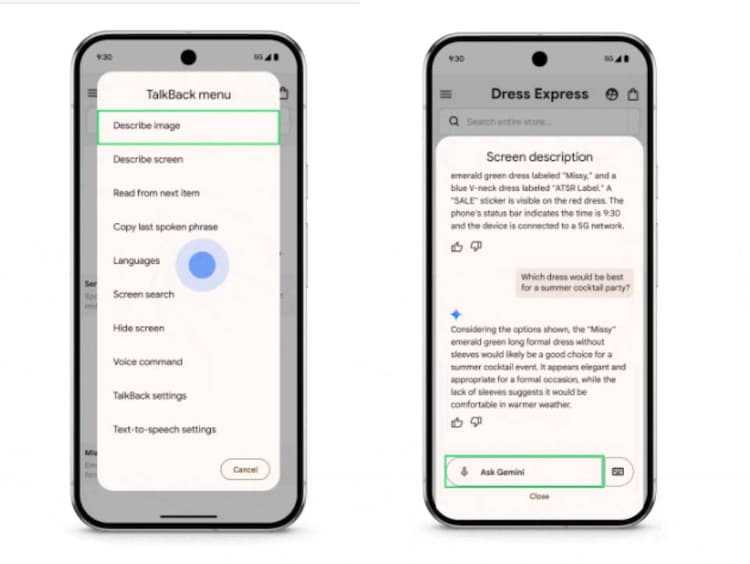
For instance, users can now ask:
- What color is this item?
- What material is it made of?
- What else appears in this image?
According to Google, “…if you’re shopping for the latest sales on your favorite shopping app, you can ask Gemini about the material of an item or if a discount is available.”
Expressive Captions
Google has also launched Expressive Captions, an AI-powered tool that adds real-time captions to any audio or video across most apps on Android 15+ devices. What sets this apart is its ability to capture emotion and tone, not just the words.
As Google explains, “We know one of the ways people express themselves is by dragging out the sound of their words, which is why we developed a new duration feature on Expressive Captions…”
That means instead of just “no,” users will now see “nooooo,” and “amaaazing shot” instead of just “amazing shot.” The feature also recognizes ambient sounds like whistling or throat clearing.
This update is currently available in English for users in the US, UK, Canada, and Australia on Android 15 and above.
Accessibility Boost for Chrome on Chromebooks
In a final accessibility push, Google has ensured that assistive tools like ChromeVox screen reader and Dictation now work with the College Board’s Bluebook app, used for SAT and AP testing on Chromebooks. This makes high-stakes testing environments more accessible for students with disabilities.