WhatsApp has started rolling out sound stickers on Android. The feature lets users send stickers that play short audio clips on tap. As a result, this marks the app’s biggest sticker upgrade in years.
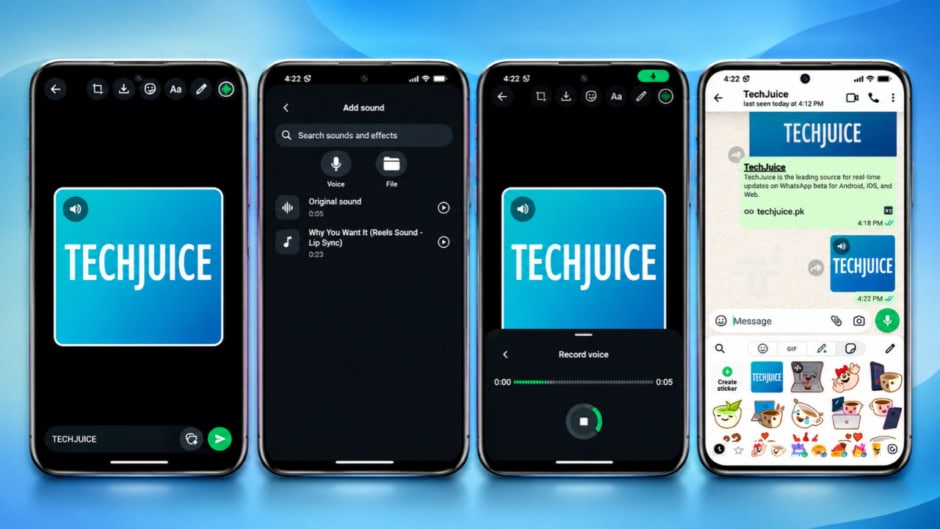
Users can now create sound stickers from both still images and videos. For image-based stickers, a new sound wave icon appears in the creation toolbar. Tapping it allows users to record their voice or attach an audio file. However, audio clips max out at 10 seconds for image-based stickers.
Meanwhile, video-based stickers work slightly differently. The tool automatically retains the first five seconds of a video’s original audio. Additionally, users can replace that audio with a custom voice recording or another file from storage.
In the chat, sound stickers look just like regular ones at first glance. However, an audio icon appears on the sticker to signal it contains sound. Recipients then tap the volume icon to play the attached clip. In fact, the audio does not autoplay at all.
WhatsApp also respects device audio settings with this feature. If a phone is in silent mode, sound stickers play without any audio. Furthermore, users can manually mute individual sound stickers by tapping the volume icon. The app then remembers that mute preference until the user changes it.
In addition, both the sticker and its audio track receive end-to-end encryption. This keeps the feature in line with WhatsApp’s broader privacy framework.
Alongside sound stickers, WhatsApp is also rolling out a toggle to remove automatic sticker outlines. This option now appears directly in the sticker creation toolbar. Moreover, the app is testing a redesigned compose box layout. It places the text field on top with emoji, attachment, and camera controls in a strip below.
WhatsApp previously removed its avatar stickers feature after users did not widely adopt it. As a result, sound stickers represent a fresh attempt at making the format more engaging. However, WhatsApp has not confirmed when the feature will reach iOS, WhatsApp Web, or desktop apps. The feature first surfaced in beta versions 2.26.41.3 and 2.26.41.11.