
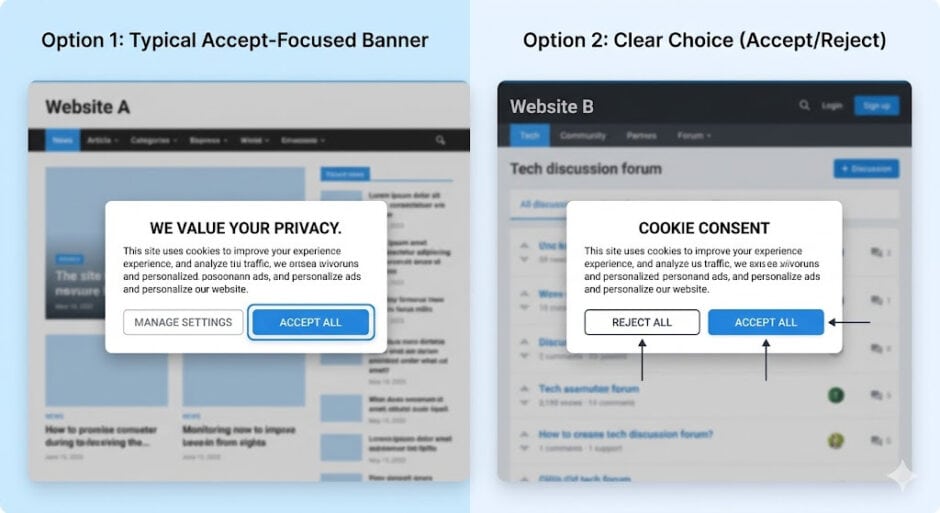
Every time you visit a website, you encounter the same question: accept or reject cookies? While most people quickly click “accept all” just to start browsing, this simple choice carries significant implications for your online privacy and security.
This comprehensive guide explains everything you need to know about cookie consent to make informed decisions about your digital footprint.
What Are Cookies and Why Do Websites Use Them
Cookies are small text files that websites save to your device to enhance user experience. Created in 1994 as a solution for e-commerce shopping carts, cookies have evolved into essential tools for website functionality.
They remember login credentials, language preferences, shopping cart items and browsing history to create personalized experiences. However, while first-party cookies from websites you visit directly serve mostly helpful purposes, third-party cookies from advertisers can track your activities across multiple sites to build detailed behavioral profiles.
Understanding Different Types of Cookies

Not all cookies serve the same purpose. Essential cookies are strictly necessary for website functionality, powering features like login sessions and shopping carts that you cannot opt out of. Functional cookies remember your preferences such as language settings and font size to personalize your browsing experience.
Analytics cookies collect statistical information about how visitors use websites to help owners improve performance. Advertising cookies track your information to show targeted advertisements and are usually set by third parties who can access this data across platforms.
Cookies also differ by duration. Session cookies exist only temporarily during your browsing session and automatically delete when you close your browser, while persistent cookies remain on your device for specified periods ranging from months to years, enabling long-term tracking of your online behavior.
What Happens When You Accept All Cookies
Choosing “accept all” allows websites and third parties to track and store your activity. This creates a more tailored experience with personalized content, recommendations and faster website loading since your preferences are saved locally.
However, you are also giving up privacy control. Third-party advertising cookies can build comprehensive profiles including your browsing habits, interests, location data and purchasing preferences. This information often gets shared across platforms and advertising networks, potentially following you around the internet with targeted ads.
What Happens When You Reject All Cookies

Rejecting all cookies except essential ones limits data collection to only what is necessary for site functionality. You will not lose access to basic website features, but personalized elements and third-party content will be missing.
The website may require you to reenter login information and preferences each visit. Your choice gets recorded in a consent cookie, and you may be reminded to update preferences in six to twelve months. Most importantly, you can change your mind anytime through cookie settings usually located at the website footer.
The Legal Framework Behind Cookie Consent
Cookie consent pop-ups are ubiquitous thanks to the General Data Protection Regulation that came into effect in 2018. The GDPR provides strict regulations for how personal data is handled online and classifies cookies as online identifiers constituting personal data. Working alongside the ePrivacy Directive, also known as the EU Cookie Law, these regulations require websites to obtain explicit consent before storing non-essential cookies on user devices.
Since internet traffic is international, many websites even outside the European Union choose to follow GDPR guidelines to avoid legal violations. Non-compliance can result in fines reaching up to 20 million euros or 4% of annual global turnover, whichever is higher. Similar privacy laws exist in California through the California Consumer Privacy Act, Brazil’s LGPD, and growing state legislation across the United States.
Cookie Consent Fatigue and Better Alternatives
The constant barrage of cookie pop-ups leads to “consent fatigue” where users simply accept everything without considering implications. This defeats the purpose of informed consent. A more robust solution exists through Global Privacy Control, a technical specification developed by stakeholders from web developers to civil rights organizations that allows browsers to signal privacy preferences automatically rather than requiring explicit choices on every site.
GPC is legally recognized under California’s CCPA and must be honored by covered businesses as a valid opt-out request. Several browsers including Firefox, Brave and DuckDuckGo support GPC natively, while Chrome users can enable it through extensions like Privacy Badger. California, Colorado and Connecticut launched coordinated enforcement sweeps in September 2025 targeting businesses that ignore GPC signals, marking a significant shift from the failed Do Not Track initiative.
Privacy and Security Risks of Cookies
Beyond privacy concerns, cookies present security vulnerabilities. Session hijacking attacks can steal session cookies to gain unauthorized access to user accounts. Cross-site scripting exploits vulnerabilities in web applications to steal cookies and impersonate users.
Third-party cookies facilitate intrusive advertising and enable collection of vast amounts of personal data often used for profit beyond user awareness. Marketing cookies have advanced significantly in tracking capabilities, performing sophisticated user profiling across websites and creating detailed behavioral profiles that can include sensitive information.
How to Manage Cookie Settings Across Browsers

Every major browser provides tools to control cookies. In Chrome, navigate to Settings, select Privacy and Security, then Third-Party Cookies to block tracking cookies while allowing essential ones. Firefox users can access Enhanced Tracking Protection and Cookies and Site Data under the Privacy and Security panel.
Safari offers Prevent Cross-Site Tracking enabled by default, blocking third-party cookies from sites that track users. All browsers allow you to view stored cookies, delete them selectively or clear all browsing data including cookies, cache and history.
For mobile devices, iPhone and iPad users find cookie settings under device Settings rather than Safari preferences, while Android browsers offer similar controls through app settings menus. Most modern browsers also provide incognito or private browsing modes that automatically delete cookies when you close the session.
The decision to accept or reject cookies depends on balancing convenience with privacy. For short-term website visits or one-time tasks, rejecting non-essential cookies avoids unnecessary tracking. When browsing sensitive topics related to health, finances or personal matters, declining cookies or using incognito mode maintains privacy.
For frequently visited websites where you want saved preferences, accepting functional cookies while rejecting advertising cookies offers a middle ground.
Privacy Control
Consider enabling Global Privacy Control in your browser to automate privacy choices across websites. Regularly clear your cookies and review which websites store data on your device. Read privacy policies to understand how websites collect, use and share your information. Stay informed about emerging privacy threats and follow cybersecurity best practices.
The internet relies on cookies for core functionality, but understanding what you’re consenting to empowers you to protect your privacy while enjoying personalized online experiences.
Whether you choose to accept all, reject all or customize cookie preferences, making an informed decision puts you in control of your digital footprint in an increasingly tracked online world.