Cybercriminals have launched a sophisticated new phishing campaign targeting Microsoft users. This attack uses a deceptive “typosquatting” technique to steal login credentials. Hackers are registering domains like “rnicrosoft.com“, where the letters “r” and “n” are placed together to mimic the letter “m”.
The “rn” Optical Illusion
This attack, flagged by Harley Sugarman, CEO of cybersecurity firm “Anagram”, relies on an optical illusion. In many modern digital fonts, the kerning (spacing) between “r” and “n” makes them appear fused. Consequently, they look nearly identical to the letter “m”.
To a casual observer, noreply@rnicrosoft.com looks exactly like a legitimate Microsoft address. The threat is even more dangerous on mobile devices. Smaller screens and truncated address bars make these subtle differences much harder to spot.
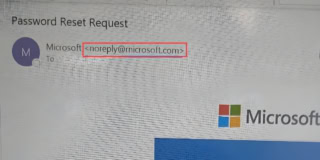
Hackers design these emails to mirror official Microsoft correspondence perfectly. They copy the official logo, layout, colour palette, and tone. Once a user trusts the email, the attackers deploy various scams. These include fake credential harvesting pages, fraudulent vendor invoices, and internal HR impersonation campaigns.
How to Spot the Fake Microsoft
This “rn” swap is just one tool in the attackers’ kit. They use other visual cheats to fool victims. Common variants include:
- Swapping the letter “o” for a zero “0” (micros0ft.com)
- Adding hyphens (microsoft-support.com)
- Changing the top-level domain (microsoft.co)
Automated security filters often miss these domains because they are technically valid and may not initially host malware. Therefore, users must be vigilant.
Steps to protect yourself:
- Expand the Sender Address: Before interacting with an email, always click to reveal the full sender details.
- Hover Over Links: On a desktop, hover your mouse over hyperlinks to see the actual destination URL. On mobile, long-press the link.
- Check the Reply-To Field: Analyse email headers to ensure replies aren’t routed to an external inbox.
- Avoid Email Resets: Ignore password reset links sent via email. Instead, navigate directly to the official service in a new browser tab.
- Use MFA: Enable phishing-resistant Multi-Factor Authentication, such as FIDO keys.