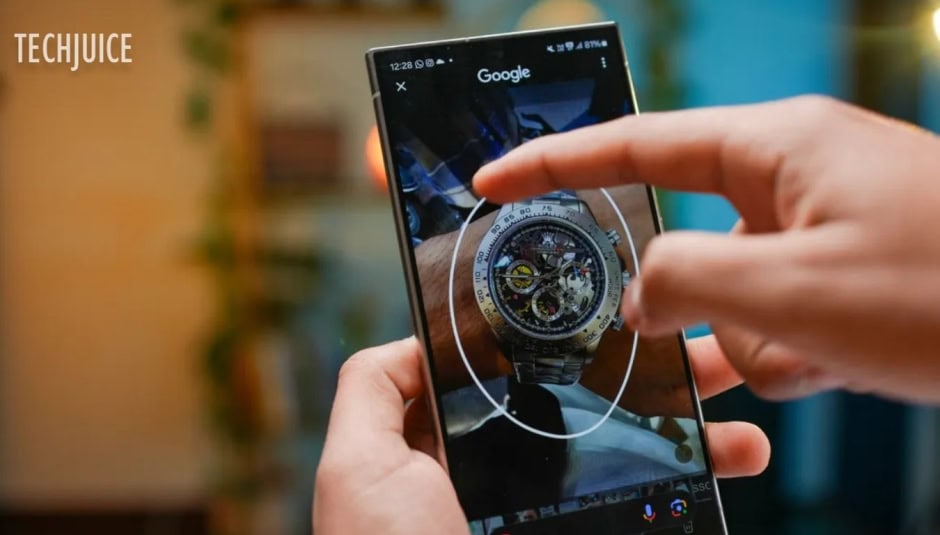
Google is releasing a new update on Wednesday that lets people search what’s on their screen with just a small movement while using Google Chrome or the Google Search app on iOS. This function is comparable to Android’s native “Circle to Search” functionality, which likewise enables users to search in-screen content using a range of gestures.
Google Lens will also be available at launch for iPhone users to search what’s on-screen by drawing, highlighting, or tapping on something.
How to Access the New Search Feature
Users can access the functionality by:
- Opening the three-dot menu in Chrome or the Google Search app.
- Selecting “Search Screen with Google Lens.”
- In the coming months, Google plans to introduce a dedicated Lens icon in the address bar for easier access.

While the feature’s primary goal is to eliminate the need to capture screenshots or open new tabs when conducting visual searches while browsing, it also provides users with an additional way to initiate more conventional web searches, which may be affected by the company’s long-term decision to use AI technology.
Visual matches and other relevant results will be displayed after you tap or highlight an item on your mobile device’s screen. You can further narrow your search by color, brand, or any other detail by tapping the “Add to your search” button. To get even more information on a subject, you may also ask follow-up questions.
The new functionality can be accessed by opening the three-dot menu and selecting “Search Screen with Google Lens.” According to Google, the capability will be accessible in the next months via a new Lens icon in the address bar.
The update is set to be released worldwide on iOS later this week.
On top of that, Google has revealed that it would be adding additional Google Lens search results to its AI Overviews feature, which provides a brief summary of results displayed at the top of the page.
In earlier versions of Lens searches, Google would show AI Overviews alongside text and photos. The most recent version allows users to access AI Overviews without having to include any extra text or questions in their searches.
For example, if you see a cool car, you may snap a photo of it and immediately receive an AI Overview with information about the subject and links to relevant online resources.
The Google app for iOS and Android is the first to receive the upgrade this week, and it will roll out to English-language users in countries where AI Overviews are accessible.
The business has announced that the update will be available for desktop and mobile Chrome users in the near future.