

Microsoft is removing the Windows Management Instrumentation Command-line (WMIC) utility from Windows 11 24H2 and 25H2 starting with the September 2026 Security Update.
This new step means ending a command-line tool that has remained part of Windows since the operating system’s earliest versions. The company deprecated WMIC in 2016 and disabled it by default in Windows 11 version 23H2, but the complete removal marks a significant shift for administrators still relying on legacy automation.
The important distinction Microsoft emphasizes is that Windows Management Instrumentation (WMI) itself remains available through PowerShell, programming interfaces, and other supported tools. Only the wmic.exe command-line utility disappears, preserving underlying management capabilities while eliminating the aging interface. However, this distinction offers cold comfort to organizations maintaining thousands of legacy scripts.
The batch files containing wmic commands, PowerShell scripts launching WMIC as an external utility, login and startup scripts, scheduled tasks, inventory and monitoring systems, and older installation packages all depend directly on WMIC availability. Organizations running automated deployment pipelines, system inventory tools, and remote administration workflows face immediate challenges during migration.
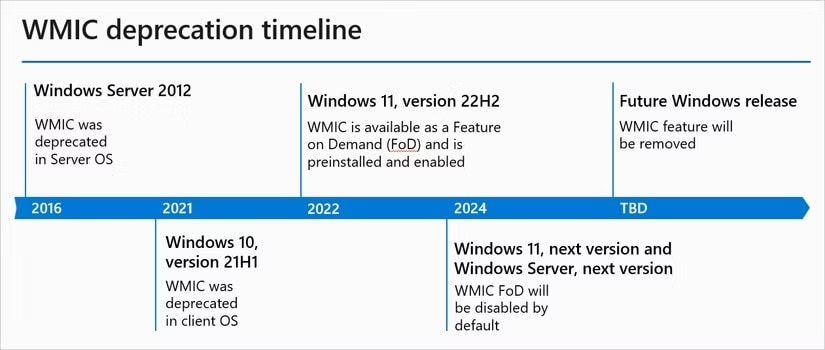
Microsoft suggests PowerShell as the modern replacement, offering superior functionality and better security than WMIC. PowerShell provides identical WMI data access with enhanced capabilities suited to contemporary automation requirements. However, transitioning thousands of legacy scripts to PowerShell demands substantial effort, testing, and documentation updates.
The removal follows Microsoft’s broader strategy of modernizing and hardening Windows by eliminating outdated components. VBScript removal, deprecated through 2026 with plans for eventual elimination, follows the same trajectory toward PowerShell standardization. This pattern reflects Microsoft’s commitment to consolidating legacy administration tools into unified, secure platforms.
Organizations should begin migration planning immediately rather than waiting until the utility vanishes completely. Testing PowerShell replacements in development environments allows teams to identify compatibility issues before production systems encounter failures. Scheduled task reviews, monitoring system audits, and deployment script inventories must be completed now.