
Google Sheets now preserves Excel table formatting and pivot table functionality when importing .xlsx files, eliminating what has been one of the most persistent frustrations for users who work across both platforms.
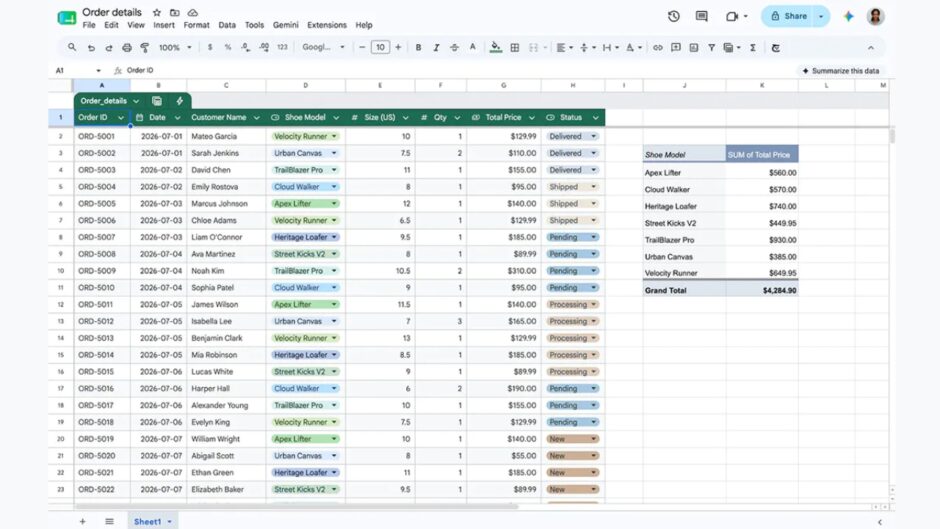
The first improvement converts imported Excel worksheets into native Sheets tables rather than dumping them as raw cell data with broken formatting. Previously, importing an Excel file stripped structural metadata, meaning carefully formatted tables lost their headers, banding, filter states, and named ranges during the conversion process. The update preserves that structural and formatting information intact, so an Excel table opened in Google Sheets now looks and behaves the way the original creator intended.
The pivot table fix addresses an even more damaging problem that has plagued cross-platform workflows for years. Until this update, importing an Excel file containing pivot tables into Google Sheets converted those interactive tables into static grids of numbers, completely severing the connection between the pivot table and its source data. Users could see the summary numbers but could not manipulate dimensions, change groupings, apply filters, or refresh the analysis when underlying data changed. The update preserves pivot tables as functional, interactive objects that remain connected to their source data and respond to manipulation exactly as they would in Excel.
Both improvements require no manual configuration or feature toggle from users, as they activate automatically on import. The changes apply to files imported directly through the Google Sheets interface and through Google Drive’s conversion pipeline when users open Excel files stored in Drive.
The broader context positions these updates within Google’s accelerating effort to close the feature gap with Microsoft Excel that has historically prevented enterprises from migrating fully to Google Workspace. Google recently added Gemini AI integration to Sheets and enabled 3D graph imports from Excel files as well. Each update chips away at the compatibility barriers that keep organizations running both platforms simultaneously, paying for both Microsoft 365 and Google Workspace licenses because neither fully replaces the other.
Both features are rolling out to Sheets users automatically, and there’s no need to manually enable anything. Importing Excel tables as Sheets tables is available right now to all users with Google Workspace or personal accounts. The ability to import pivot tables is rolling out as well and could take up to 15 days to reach everyone.