Google is testing a new search app for Windows, available through Search Labs on personal Google accounts. The app introduces a quick Alt + Space shortcut, letting users search across local files, Google Drive, and the web.
The installation feels similar to Chrome and requires a Google sign-in. Once set up, the app adds a draggable and resizable search bar directly on the desktop. Users can minimize it with the same Alt + Space shortcut.
Google has integrated its visual search tool, Lens, into the app. This allows you to highlight images on the screen, translate text, or even scan math problems. In one example, students can select a math equation and use AI Mode to get solutions.
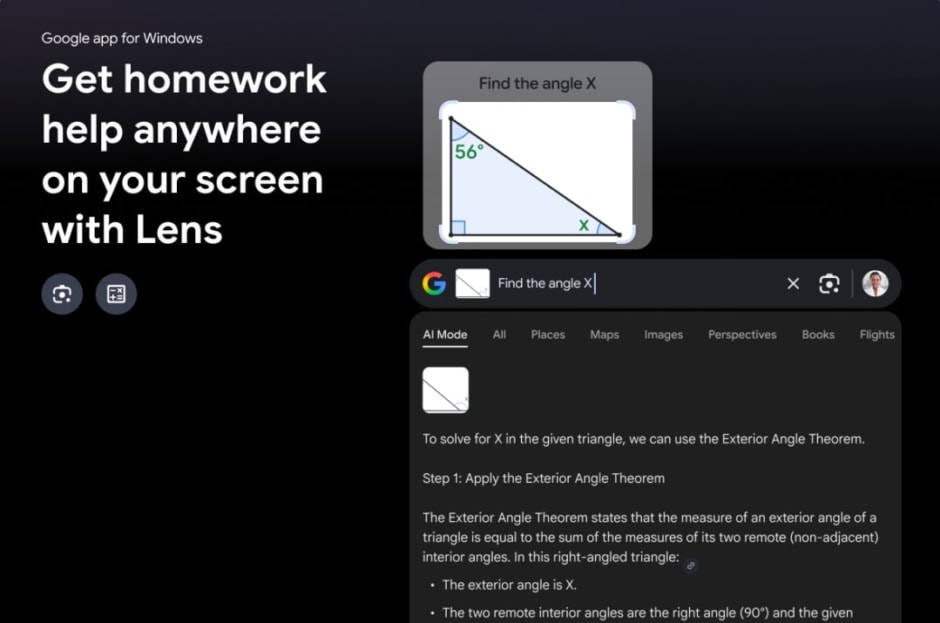
The interface mirrors the web version of Google Search. You can switch between All Results, AI Mode, Images, Shopping, and Videos. Dark and light modes are also available.
The design is reminiscent of Apple’s Spotlight, which searches apps, files, and the web on macOS. Windows already has a built-in search function, recently expanded through Copilot Plus PCs, but Google’s tool aims to bring a familiar ecosystem experience.
Users can customize the experience by toggling AI Mode or adjusting the shortcut keys in Configurations. Options appear under the profile menu. For now, the experiment is available only in English and limited to US users with Windows 10 or newer.