A dangerous new threat is targeting WhatsApp users. Security researchers at Gen Digital recently discovered a sophisticated account takeover method. They are calling it GhostPairing. This attack allows criminals to gain full access to your private messages and media. Surprisingly, they do not even need your password to succeed.
How the “GhostPairing” Attack Works
The scam starts with a simple message from a known contact. This person’s account is usually already compromised. The message typically says, “Hey, I just found your photo!” followed by a link.
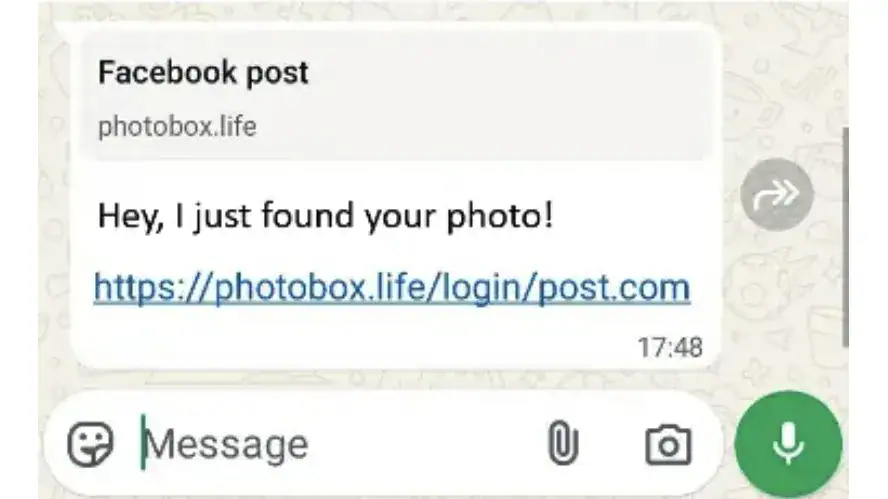
This link includes a preview that looks exactly like a Facebook post. However, clicking it leads to a fraudulent website. The site asks for your phone number to “verify” your identity. Once you provide it, the attackers trigger WhatsApp’s legitimate device-linking feature.
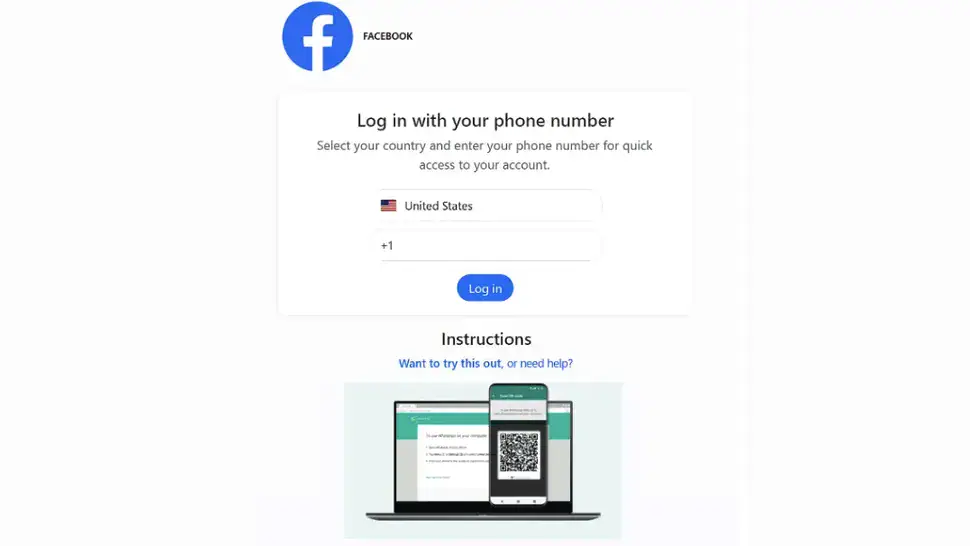
The site then gives you a numeric code or a QR code. It instructs you to enter this code into your WhatsApp app. If you follow these steps, you are not logging into Facebook. Instead, you are linking the attacker’s device to your WhatsApp account.
What Happens After a Hijack?
Once the criminal links their device, they have total control. They can read your entire conversation history. They can view your shared photos and videos. Most importantly, they can message your contacts while pretending to be you.
Attackers use this access for identity theft, extortion, or fraud. They often spread the scam further by messaging your friends. If the attacker is quiet, they could stay inside your account for a long time without you noticing.
How to Protect Your WhatsApp Account
Fortunately, you can stop GhostPairing if you stay alert. Always be wary of vague messages with links, even from friends. Look closely at URLs before clicking. For instance, the GhostPairing scam often uses domains like photobox.life instead of the official facebook.com.
If you think you might be a victim, check your settings immediately. Open WhatsApp and go to:
Settings => Linked Devices
You will see a list of every device with access to your account. If you see a device you do not recognise, revoke its access instantly.
WhatsApp will always notify you when a new device tries to link. Do not ignore these alerts. Read every prompt carefully before entering any codes. Your security depends on your attention to detail.