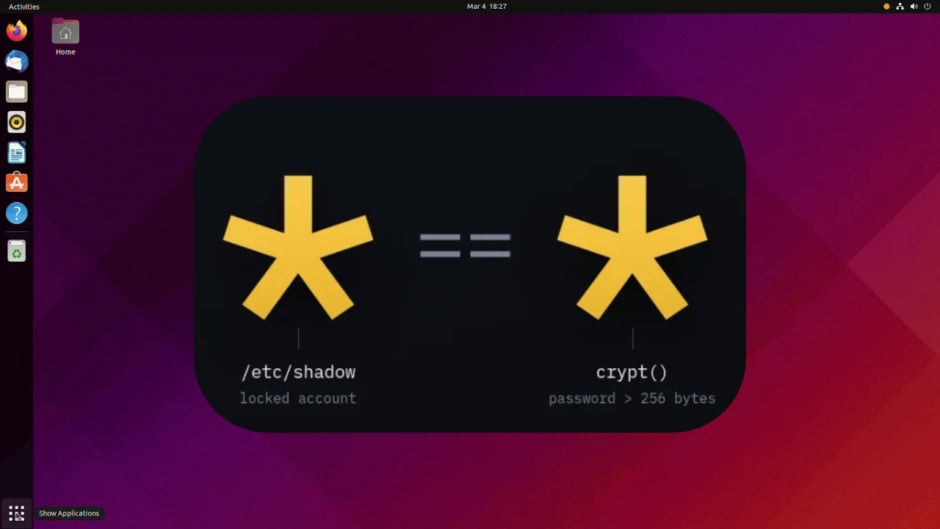
A critical OpenSSH vulnerability lets attackers log into certain Linux servers without knowing the password. The flaw, cheekily nicknamed “*sshole” by its discoverer, affects Alpine Linux and other systems built on the musl C library. Security researcher Özgün Kültekin disclosed it on November 5. OpenSSH rushed out an emergency patch the same day.
The attack is almost absurdly simple. An attacker types any string longer than 256 characters as the password. On affected systems, this gets accepted as valid authentication. *sshole works against accounts configured with an asterisk in the password field, which normally means “no password login allowed.” Consequently, accounts meant to accept only SSH keys become wide open to anyone who sends a long enough string.
Understanding why *sshole works requires a quick detour into how passwords get checked. When OpenSSH runs without the Pluggable Authentication Module, it checks passwords itself using the system’s crypt function. On Alpine Linux, that function comes from musl rather than the more common glibc. When musl’s crypt receives an input longer than 256 bytes, the hash operation fails. Instead of returning an error, it returns an asterisk.
That asterisk then matches the asterisk stored in the account’s password field. The system sees a match where none should exist. Essentially, a hashing failure accidentally becomes a successful login. The name *sshole comes from this asterisk behavior, where the * in the password field becomes the hole attackers walk through.
The vulnerability traces back to a 2016 patch for CVE-2016-6210. That fix addressed a username enumeration issue by making OpenSSH hash passwords even for accounts without usable hashes. The interaction between that patch and musl’s behavior created this bypass. The *sshole flaw then sat unnoticed for roughly a decade before Kültekin’s AI agents caught it.
As explained by Alpine Linux:
You are affected if all of the following are true:
- You run the Alpine
openssh-serverpackage, which is built without PAM, or you runopenssh-server-pamwithUsePAM no. (openssh-server-pamwithUsePAM yesis not affected.) PasswordAuthenticationisyes(the OpenSSH default, unless you changed it).- The machine has an account whose password field is
*. This includes:root, which ships asroot:*in the base image since about Alpine 3.16. OpenSSH’s defaultPermitRootLogin prohibit-passwordprotects root, so root is only reachable ifPermitRootLogin yesis set. That does not help if another account that can log in is able to become root, for example throughdoas.- Any key-only user created with
adduserwithout a password, or withusermod -p '*'. - Users coming from a directory service through musl-nscd (nslcd, winbind, sssd), since they have no shadow entry.
- The
alpineuser in the official tiny-cloud images.
- At least one local account has a
$5$or$6$password hash.
Affected releases: every Alpine release we checked, 3.21 through 3.24 and edge, and the older releases that no longer receive regular updates (3.16 to 3.20).
Not every Linux system faces this risk, though. The flaw requires three specific conditions simultaneously: the server runs OpenSSH without PAM, password authentication remains enabled, and at least one other account on the machine holds a real password hash. Systems using glibc, or those checking passwords through PAM, remain unaffected entirely.
OpenSSH, which issued an update Thursday, said: “We consider the root cause of this bug to be outside sshd, but it is exploitable via sshd and can be avoided there.”
However, the affected surface is not trivial. Developers and cloud teams use Alpine Linux extensively in Docker containers and cloud environments. Kültekin specifically noted that official Alpine Linux cloud images for AWS and Azure contain a default “alpine” account with passwordless privileges. He discovered the *sshole vulnerability using AI agents that ran approximately 17,600 authentication tests.
OpenSSH released version 10.6p2 to fix the issue. Additionally, project developer Damien Miller urged administrators of affected systems to disable password authentication or shut down SSH immediately. The advisory also stated bluntly that administrators should treat any machine with a suspicious login as compromised. They can check for exploitation by searching logs for “Accepted password” entries.