Consumer-grade spyware, commonly known as stalkerware or spouseware, is an ongoing security concern for Android users. The hidden surveillance program monitors private messages, photos, and phone calls while also providing real-time location data, jeopardising personal privacy and security.
Such monitoring software are marketed for child and family protection, but they are ultimately used illegally to monitor people without their permission. Installing stalkerware products outside of the Google Play Store makes it more difficult to detect them. Such programs remain hidden from view on the home screen while collecting unauthorised data using established Android capabilities.
If you suspect your phone is compromised, this guide will help you identify and remove stalkerware effectively.
Signs That Your Android Device May Have Stalkerware
- Your phone is running warmer or slower than usual.
- Unusual battery drainage.
- High network data usage even when the phone is not actively in use.
- Unfamiliar apps or services running in the background.
Steps to Detect and Remove Stalkerware
Enable Google Play Protect
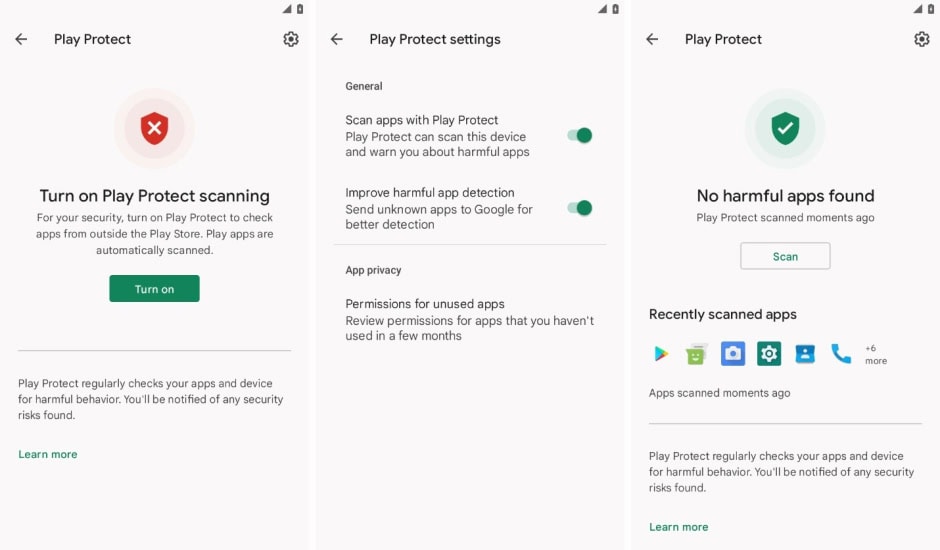
Google Play Protect helps safeguard against malicious apps by scanning for suspicious activity. Ensure that Play Protect is switched on by following these steps:
- Open the Google Play Store app.
- Tap on your profile icon in the top-right corner.
- Select Play Protect and ensure it is enabled.
- Run a scan to check for harmful apps.

Check Accessibility Services
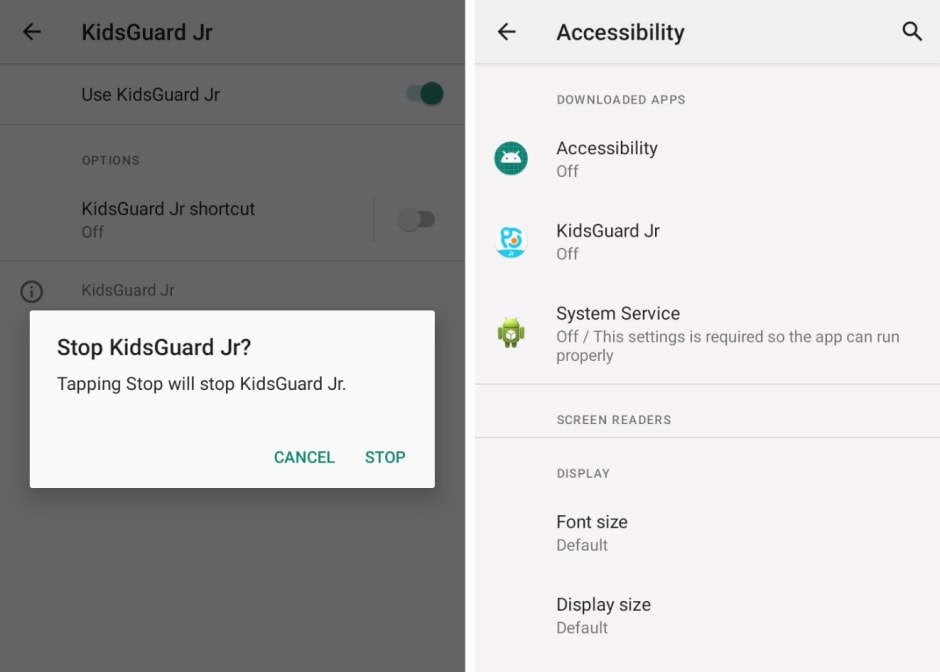
Stalkerware apps exploit Android’s accessibility mode to gain deeper access to your device.
- Go to Settings > Accessibility.
- Review any downloaded services listed under this section.
- If you find an unfamiliar app (e.g., Accessibility, Device Health, or System Service), disable it and uninstall the app.

Check App Access to Notifications
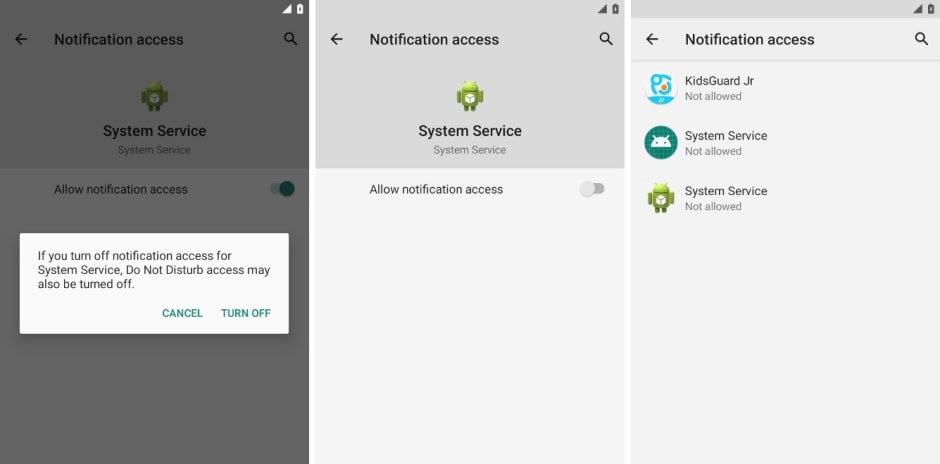
Granting notification access to a malicious app allows it to spy on your messages and alerts.
- Navigate to Settings > Apps & Notifications > Special App Access > Notification Access.
- Review the list and disable access for any unrecognized apps.

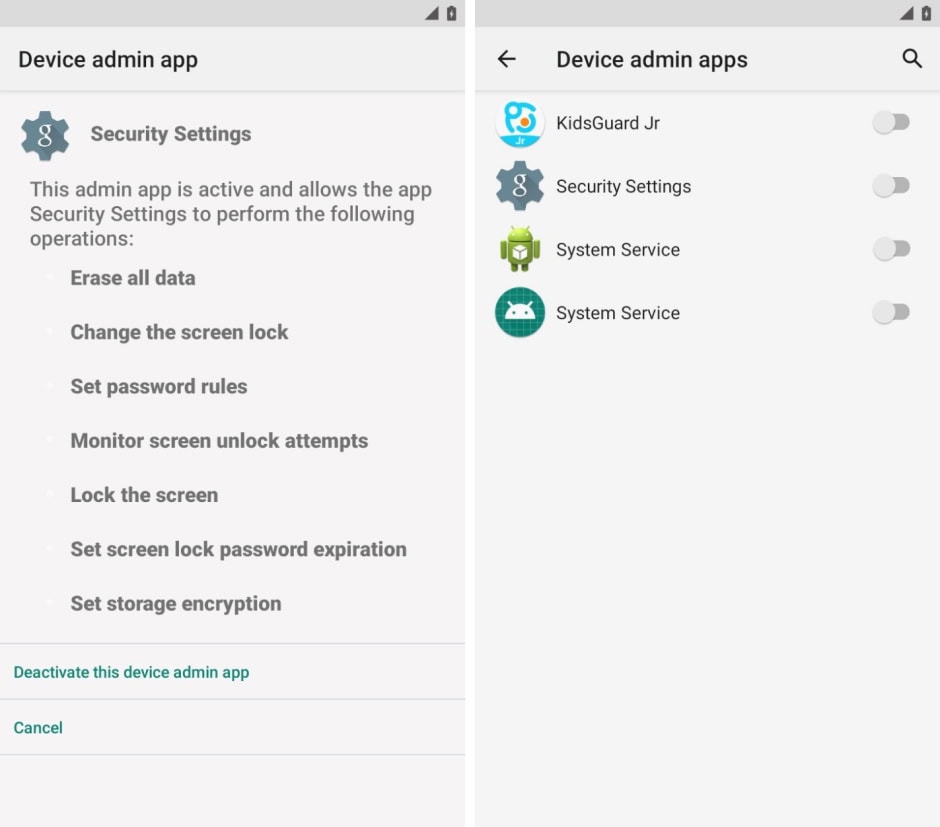
Check for Device Admin Apps
Stalkerware often abuses Android’s device admin privileges to maintain control over your phone.
- Go to Settings > Security > Device Admin Apps.
- If you see an app you don’t recognize with admin privileges, disable it and uninstall the app immediately.

Identify and Uninstall Suspicious Apps
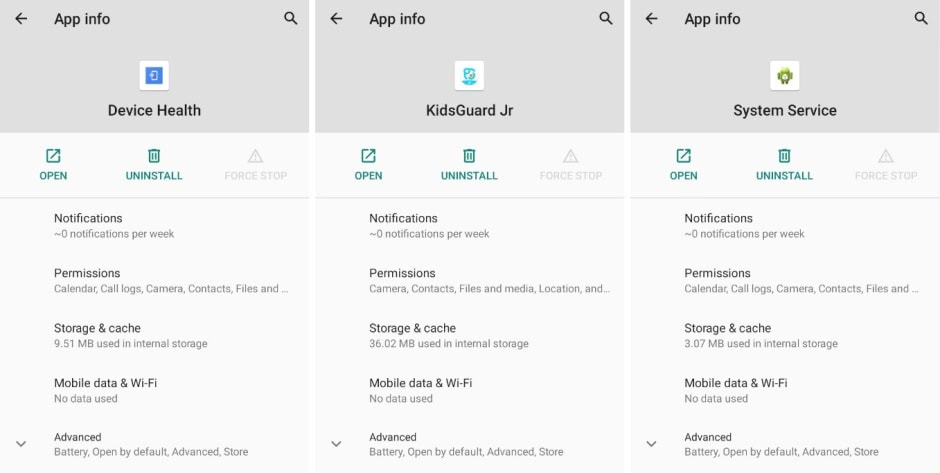
Many stalkerware apps operate without a visible home screen icon but still appear in the app list.
- Open Settings > Apps > Manage Apps.
- Look for apps with suspicious names like System Service, Device Health, or Admin Service.
- Tap on any unfamiliar app, force stop, and then uninstall it.

Secure Your Device
If your phone was compromised, take additional steps to protect it:
- Set up a strong lock screen password or biometric authentication.
- Enable two-factor authentication for email and important accounts.
- Regularly update your phone’s software for security patches.
The removal process of stalkerware might notify the person responsible for installation thereby putting your safety at risk primarily when you are experiencing domestic abuse. When you need help removing stalkerware call the Coalition Against Stalkerware and their support teams along with your trusted support network.
The privacy violation from stalkerware remains a major security threat which you can combat through constant awareness and appropriate preventative steps. The removal process for spyware from Android devices becomes achievable by following this protocol which secures your personal data from unauthorized access.